Previous: Vegetation Management Data Layers
The Overview Report widget provides a system-wide snapshot of work progress for vegetation management inspection or clearance (trim and removal tree work) for electric distribution systems.
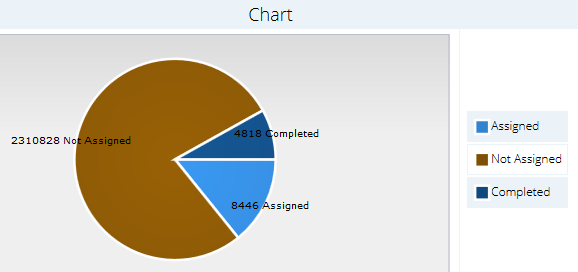
Click the Report icon  to open the Report widget. By default the report widget will generate an Entire System report for all the all the vegetation available in inSITE. The overview report categorizes detections based on their status in the vegetation management workflow. The overview report uses the following status categories:
- Not Assigned: Trees or cage clearance zones identified by LiDAR analytics that have not been assigned to inspection or clearance work orders.
- Assigned: Trees or cage clearance zones identified by LiDAR analytics that have been assigned to inspection or clearance work orders but have not yet been inspected or cleared.
- Completed: Trees or cage clearance zones identified by LiDAR analytics that have been assigned to work orders and confirmed as inspected or cleared by utility foresters or tree crews.
If your inSITE data includes both electric distribution and transmission data, click the Distribution or Transmission button then click Generate Report to show a report for either type of utility infrastructure.
Select an option from the Filter Options dropdown menu then click Generate Report to generate a report for a targeted area like a management region or circuit.

When viewing an Entire System report, click Export WO Summary to download a spreadsheet with status details for individual work orders.
0 Comments